

#What is iGraph
iGraph is a graph data agent. It represents objects and relationships as nodes and edges, locates entities, traces connections, identifies structures, or trains suitable graph models around your question. The agent calls tools to compute results and explains the evidence they return; you can continue the analysis in the same conversation.
The agent decides what evidence the question requires, whether the available results are sufficient, and which objects to investigate next. Graph Engine manages graph data and versions, executes queries, algorithms, training, and inference, and returns structured results. The frontend presents conversation, progress, graph views, and reports; the runtime stores sessions, tool calls, and execution state. Follow-up questions can use the same graph, with confirmed state and completed results providing context.
Skills organize analysis procedures, such as checking graph state and weight semantics before choosing path or centrality tools and interpreting result scope. Self-evolving construction prepares and optimizes graph schemas: when relational data needs a graph, or an existing graph schema is unsuitable for established queries, it preserves source semantics, compares candidates, and retains strategy experience. An available graph can be loaded and analyzed without rebuilding it for every question.
The current version uses a single-user workspace that opens directly, without sign-in, registration, or account switching. Projects, sessions, model connections, memory, and skills belong to the default workspace; analysis still checks project, dataset, and session scope.
#Start here
Start the system, confirm session and graph state, and begin an analysis.
Experimental resultsSee graph-analysis success rates and construction-agent cost reductions relative to PK/FK rule-based construction.
Workspace guideFollow the UI from upload, preview, and construction through graph analysis, training, and reports.
Graph analysis toolsFind arguments and outputs for queries, algorithms, learning, and reports by analysis goal.
Graph schema preparation and optimizationSee how self-evolving construction preserves semantics, validates graph schemas, and reuses experience for analysis.
API referenceRequest parameters, response shapes, and copyable examples.
#Why graphs drive analysis
Many data questions concern connections among objects rather than values in one column. Representing customers, orders, suppliers, or devices as nodes, and references, transactions, dependencies, or connections as edges makes the traversed relationships, direction, and version explicit. Data must establish their business meaning first; a graph model does not determine whether an edge represents control, influence, or causation.
| Analysis question | Graph operation | Evidence and interpretation |
|---|---|---|
| How are objects connected? | Entity lookup, neighborhoods, and paths | Actual node identities, connection sequences, and reachability scope, interpreted using confirmed relationship directions. |
| Which objects occupy important structural positions? | Degree, centrality, and connectivity | Rankings or structural properties under the chosen metric; high scores do not automatically imply business value or risk. |
| Which groups or local patterns are present? | Community detection, subgraphs, and visualization | Structural groupings, local connections, and display scope; community labels require business context. |
| Can graph features support prediction? | Node classification, link prediction, graph classification, or pretraining | Model outputs, evaluation metrics, and embeddings, limited by features, labels, splits, and the task implementation. |
An analysis can combine these operations while preserving consistent input semantics. For example, community detection may identify groups to inspect before querying connections between their actual nodes; centrality comparisons may lead to neighborhood inspection. Each next step depends on prior results and the user goal. Queries, rankings, visualization, and prediction supply different kinds of evidence and are not interchangeable.
#How an analysis progresses
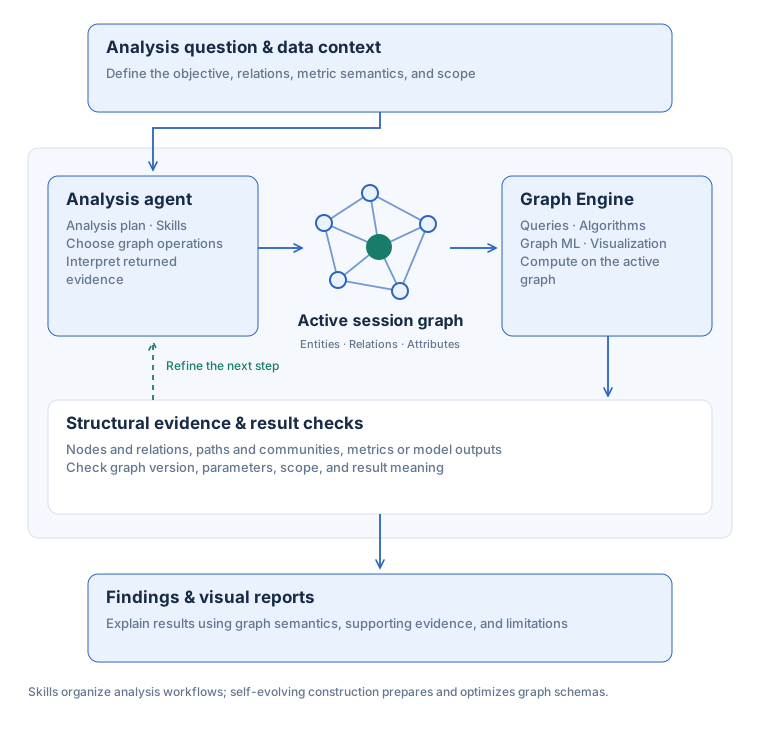
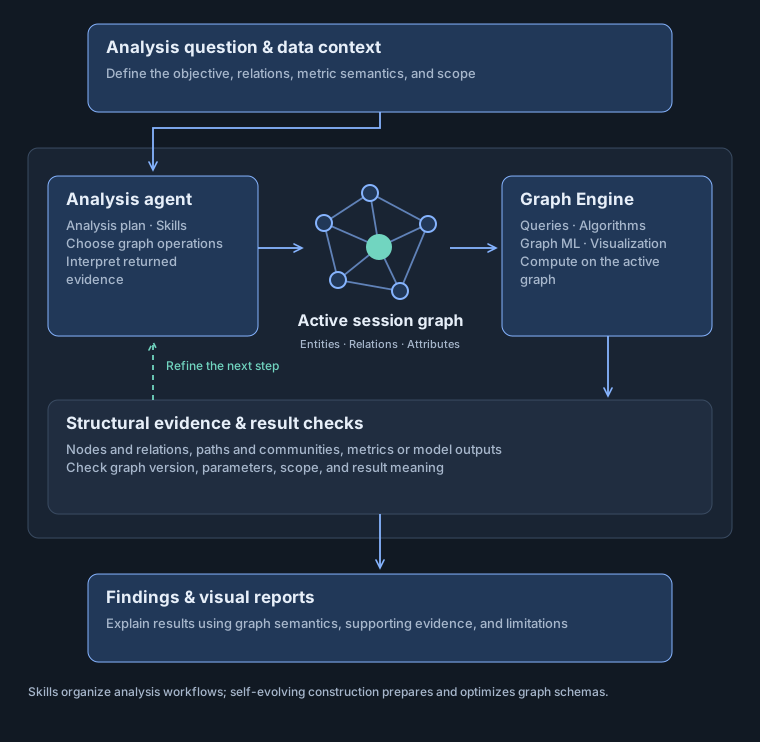
Analysis progresses through the question, graph evidence, interpretation, and the next step. The diagram describes the flow between modules; it does not require construction, training, or a report for every request. A focused path question may need only state checks, entity lookup, and path computation, while broader analysis may span multiple model turns and tool branches.
- Establish the question and scope: identify the objects to compare or explain and check attachment datasets, project scope, and existing session state.
- Confirm the graph schema with get_graph_info. Load a saved constructed graph or use the appropriate preparation entry when needed, checking entity types, edge direction, weights, and graph_version.
- Choose evidence-producing operations such as lookup, paths, centrality, and communities. Use graph learning only when its task definition and data prerequisites are adequate.
- Execute and read results. Independent operations with known arguments can be submitted together; operations requiring discovered node IDs or a newly trained model_id must wait for those results.
- Check evidence scope: success, terminal job state, direction, and version, plus truncation, bounded queries, unmatched objects, and model-evaluation protocols. Investigate gaps or state them explicitly.
- Explain and continue: distinguish supported observations from inference, show a subgraph or create a report when useful, and use confirmed state and results for follow-up questions.
Tool scheduling manages resource conflicts and execution order; it does not invent missing arguments for the agent. Tool success confirms that an operation completed, not that a natural-language interpretation is correct. Structural association, prediction scores, and business causes require separate interpretation; the workflow provides no general causal-inference guarantee.
#Tool-evidence example: tracing connections between entities
Suppose the user asks: “Is there a connecting path between Supplier A and Factory B in the current supply-relationship graph, and which objects does it pass through?” The following calls are illustrative, not an execution record, and make no assumption about whether a path exists. They require a loaded graph with established direction semantics; a supply relationship does not automatically encode material flow, transaction value, or causal influence.
First confirm the active graph. The name / arguments objects below describe tool calls and their arguments. Read and check the actual get_graph_info result before searching for objects.
{
  "name": "get_graph_info",
  "arguments": {}
}After checking the graph state, search for both names. The two searches are independent and may be submitted together. Inspect search_node candidates for ambiguity and use confirmed actual node names.
[
  {
    "name": "search_node",
    "arguments": {
      "query": "Supplier A",
      "top_k": 5
    }
  },
  {
    "name": "search_node",
    "arguments": {
      "query": "Factory B",
      "top_k": 5
    }
  }
]
After confirming both nodes, call shortest_path. This example minimizes hops and explicitly sets use_weight=false. Replace the placeholders with node names from the search results, and confirm that the active graph direction matches the traversal intended by the question.
{
  "name": "shortest_path",
  "arguments": {
    "source": "SUPPLIER_NODE_FROM_SEARCH",
    "target": "FACTORY_NODE_FROM_SEARCH",
    "use_weight": false,
    "algorithm": "default"
  }
}| Evidence obtained | How to use it next |
|---|---|
| get_graph_info | Confirm load state, graph version, size, and semantics to identify the graph underlying the result. |
| search_node | Check actual candidate names, types, and ambiguity flags. Request more information for unmatched objects rather than inventing plausible IDs. |
| shortest_path | Interpret actual found, path, and hop_count fields. For bounded remote queries, inspect scope as well; not finding a path does not always establish global unreachability. |
| visualize_subgraph | If a path is found, pass its returned node sequence to highlights.paths[].node_sequence, display its structural evidence, and state whether the view is truncated. |
| create_analysis_report | For a requested report, place completed tools’ raw responses in source_results under their actual tool names. Reporting organizes evidence without fabricating missing paths or business conclusions. |
The final explanation must follow the actual result: if a path is found, describe its objects and relationship directions; otherwise state the search scope and any missing data. Claims about delivery risk, supplier control, or business causes need additional evidence and cannot follow from a path alone.
#How skills and self-evolving construction support analysis
Skills supply reusable analysis procedures, while construction supplies the graph schemas those procedures need. Both serve the analysis goal: use an existing suitable graph directly, and enter construction and validation when preserving relational sources or optimizing a graph schema for fixed queries is necessary. Independent SQL validation in tabular construction checks graph schema transformations; it does not automatically validate every answer from the main agent.
Relational construction builds a property graph from SQL, CSV, tabular TXT, or line-based TXT, preserves records, declared keys, and column types, and compares a fixed query set against an independent SQL reference executor. Plain TXT also supports model-based entity and relation extraction; that path checks output structure and source grounding rather than relational SQL equivalence.
Evolution follows two independent paths. Approved user skills reuse procedures in later tasks, while the construction strategy store retains evidence of successful, unhelpful, or unsafe transformations to rank candidates for similar tasks. Evidence guides decisions, but each dataset is validated anew. A run that finds no graph schema with lower query costs can still retain a valid baseline and contribute useful negative feedback.
#Scope and boundaries
| Capability | Current implementation |
|---|---|
| Agent orchestration | Agno AgentOS sessions, runs, approvals, learning, and resumable event streams. |
| Graph computation | Visualization, graph algorithms, GNN training and inference; heavy tasks run in Graph Engine. |
| Tabular construction | CSV, delimited tabular TXT, and SQLite-compatible SQL; preserve source records and relational semantics before validating candidate graphs. |
| Natural-language extraction | Plain TXT can be constructed deterministically as line records or explicitly processed with entities, which chunks the text for entity and relationship extraction by the construction LLM. |
| Source preview | View SQL rows, CSV headers and samples, and TXT excerpts before and after construction; explanations distinguish source comments, key relationships, name-based inference, and unknown meanings. |
The TXT dataset entry point has three explicit modes. auto recognizes only strict tab-delimited tables and otherwise creates line records; lines forces line records; entities requires llm and sends the full text to the configured construction model in chunks. auto and lines do not perform natural-language entity extraction and can remain fully offline with rules. entities needs no PK/FK and only checks that edge endpoints are grounded in a source chunk and the graph satisfies its contract; entity merging, relationship labels, direction, and factual meaning still require human review.
Capabilities are exposed through specific tools and data entry points; not every upload automatically becomes an analyzable graph. Text extraction, relational construction, existing-graph loading, and multi-graph classification datasets use different structures and validation conditions. Graph-driven analysis first establishes the available graph schema and task prerequisites, then selects capabilities.
#Typical task workflows
| Task | Execution | Result checks |
|---|---|---|
| Relational-data analysis | Establish data and relationship meaning for the question → load a graph or prepare its graph schema when needed → query paths, communities, or key nodes → inspect and explain evidence. | Inspect the dataset revision, session graph_version, actual node identifiers, and query scope. |
| Optimizing a graph schema for analysis | Fix business queries → measure the current graph → transform a copy → check answers and cost → retain a valid graph schema and strategy evidence. | Require query agreement and source integrity; interpret gains using measured timings in the run report. |
| Graph machine learning | Verify features, labels, and splits → submit training → await the job → infer using the model ID. | Match the task, model, metrics, and graph; explain the split protocol and features the model actually uses. |
Before selecting an algorithm, establish what nodes, edges, and weights mean. A weight may represent distance, cost, relationship strength, or capacity, and its interpretation changes the appropriate method. Shortest paths minimize cost; maximum flow treats weights as additive capacities. Centrality rankings and community partitions answer different questions. The algorithms guide explains these choices, implementation parameters, and worked examples.