
#Four-module architecture
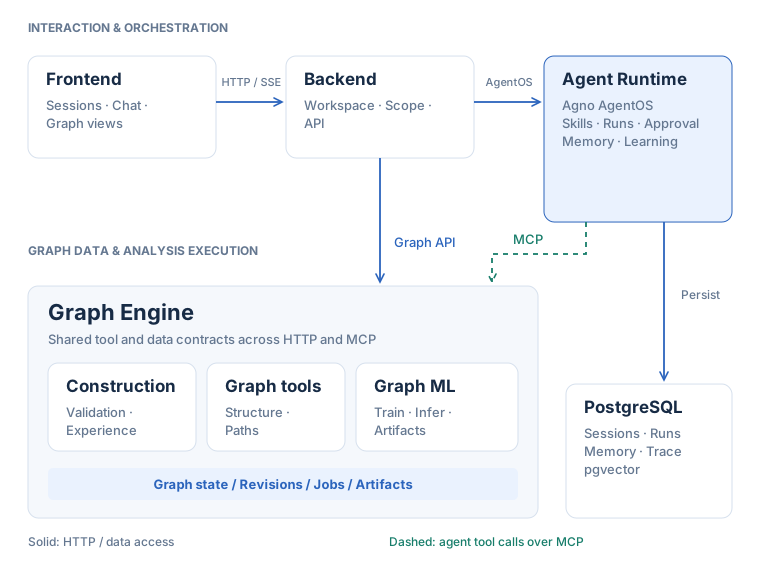
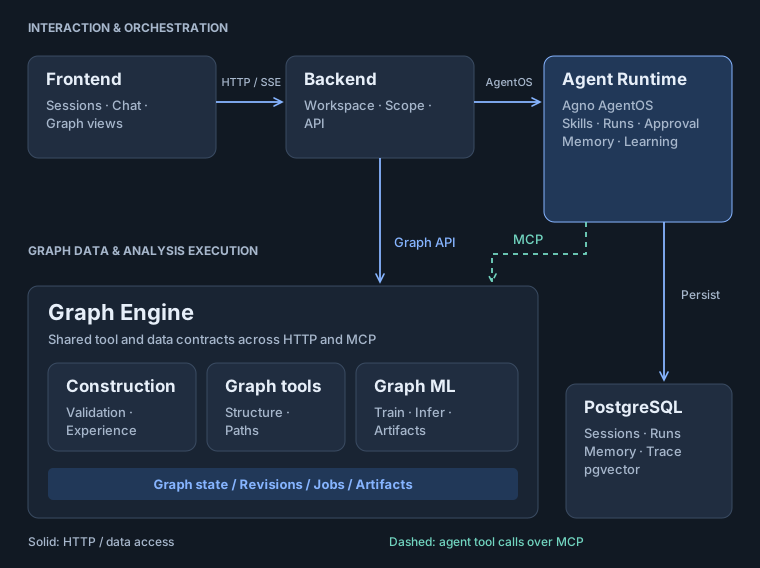
The architecture divides work around analysis: Frontend receives questions and displays evidence; Backend validates accessible data and service identity; Agent Runtime organizes analysis steps; Graph Engine provides graph schemas and computation. Returned evidence may support an explanation or prompt further entity lookup, queries, or comparisons. Self-evolving construction prepares and optimizes graph schemas used by that analysis.
| Module | Responsibility | Entry point |
|---|---|---|
| Frontend | React 18, TypeScript, and Vite; provides projects and sessions, dataset uploads and construction previews, graph and training views, reports, workspace files, and memory and skill management. | frontend/ |
| Backend | The public browser API binds requests to the default workspace, manages projects and model configuration, validates data scope, forwards runtime and graph requests, and provides workspace downloads and exports. | python -m backend |
| Agent Runtime | Agno AgentOS; selects analysis steps and interprets tool results while managing sessions, runs, memory, skills, approvals, and traces. | python -m agent_runtime |
| Graph Engine | Manages graph schemas, versions, and datasets; executes queries, algorithms, and graph learning; supports construction, jobs, and output files through HTTP and MCP adapters. | python -m graph_engine api |
#Data ownership
| Data | Ownership and storage |
|---|---|
| Default workspace ownership, projects, and model configuration | Backend configuration storage |
| Sessions, runs, messages, memory, and traces | Agent Runtime / PostgreSQL |
| Built-in, active user, and candidate skills | Agent Runtime skills directories; candidate skills are excluded from the active loader |
| Source data, graph revisions, construction results, graph jobs, and model files | Graph Engine data directories and storage |
| Session file workspace | Backend saves uploads; Agent Runtime executes workspace tools and publishes outputs; shared storage retains directories scoped to the workspace owner and session |
The file workspace contains Uploaded (read-only uploads), Ephemeral (intermediate files), Derived (published outputs), and Environment (the session execution environment). The frontend lists Uploaded and Derived and offers downloads for downloadable Derived files. The agent must publish an output before the user can obtain it there; mentioning a server path in a reply does not deliver a file.
The browser keeps session_id, run_id, event_index, and local interaction preferences for recovery. Server records remain authoritative for sessions and graphs; switching or reloading a page restores the display from persisted messages and available run snapshots.
Single-user mode reuses the existing default owner’s data directories. Preserve IGRAPH_ADMIN_USER_ID and persistent volumes during upgrades to retain those projects, sessions, and datasets. Data belonging to other former users is neither deleted nor merged automatically. Internal user_id remains a storage and request context, without browser sign-in or account switching.
#An analysis request through the system
- Frontend creates a session and submits the question and data scope through Backend.
- Backend binds the request to the default workspace, validates data scope, and calls AgentOS with background=true and stream=true to start a Run and forward SSE.
- Agent Runtime uses session state and skills to choose evidence-producing operations, then calls Graph Engine through MCP with the fixed workspace owner, session and Run context, and internal service credentials.
- Graph Engine checks tool prerequisites, input scope, and versions, executes graph operations, and returns actual results, resolving long tasks through job status.
- Evidence returns to the agent for further analysis or for explanations, graph views, and reports. AgentOS persists messages, runs, and available results; the original-event replay buffer belongs to the running process.
HTTP, MCP, and SSE serve different purposes. HTTP provides request-response interfaces for projects, datasets, state, and files. MCP exposes graph capabilities as named tools with argument schemas. SSE carries text deltas, tool state, approval requests, and job progress to the browser. The construction page also accesses Graph Engine through Backend without requiring a chat message for every operation. Closing the browser connection only stops observation; stopping server execution requires a separate cancellation request.
Graph Engine manages graph tensors, construction outputs, and model files. With durable execution control enabled, run identity, generation, and stop state propagate across services to check whether an operation may proceed and a worker may publish results. Tool success and run finalization are distinct: finalization also verifies executor exit and persisted results. The UI gates cancellation and editing the latest turn on /api/capabilities.
Explore session state, tool scheduling, event recovery, and persistence controls.
Graph data and computationExplore tensors, versioned caches, algorithm adapters, and workers.
Use the workspacePractical entry points for projects, construction, training, approvals, files, memory, and skills.
#Memory and construction experience
Session history, user memory, and construction experience provide distinct layers of context. History supports continuing a question, skills reuse procedures, and construction experience informs graph schema changes. None replaces checking the current graph and tool results.
Semantic retrieval for LearnedKnowledge requires a usable embedding model and credentials after configuration resolution. Explicit EMBEDDING settings can override provider settings; an unset EMBEDDING_API_KEY does not necessarily disable it because the configuration supports fallback credentials. Basic user profile and memory features can operate without the required embedding configuration; planning context depends on planning settings. LearnedKnowledge uses user namespaces and PROPOSE mode, separately from candidate skill review.
The tabular construction subagent keeps separate domain strategy experience inside Graph Engine. It does not read the main agent’s conversation or memory and does not automatically replace the session’s active graph.
The management panel lets users view, search, and delete memories, inspect full skill content, upload skills, and approve or reject candidates. These controls make saved content inspectable; they do not imply that every conversation automatically creates long-term memory or an executable skill.